






这篇文章直接用netty默认提供的三种解决TCP粘包/拆包的三种方案:
LineBasedFrameDecoder
DelimiterBasedFrameDecoder
FixedLengthFrameDecoder
下面各举个例子,这里都是配合StringDecoder来处理,这样子就可以直接用字符串做例子。
不使用解码器解决粘包/拆包情况
1、服务端
public class NettyServer {public static void main(String[] args) throws Exception{//1、创建一个线程组,接收客户端连接EventLoopGroup bossGroup = new NioEventLoopGroup();//2、创建一个线程组,处理网络操作EventLoopGroup workerGroup = new NioEventLoopGroup();try {//3、创建服务端启动助手来配置参数ServerBootstrap b = new ServerBootstrap();b.group(bossGroup, workerGroup)//4、设置两个线程组.channel(NioServerSocketChannel.class)//5、使用NioServerSocketChannel作为服务器端通道的实现.option(ChannelOption.SO_BACKLOG, 128)//6、设置线程队列中等待连接的个数.childOption(ChannelOption.SO_KEEPALIVE, true)//7、保持活动连接状态.childHandler(new ChannelInitializer<SocketChannel>() {//8、创建一个通道初始化对象@Overrideprotected void initChannel(SocketChannel sc) throws Exception {//把网络字节流自动解码为 String 对象,属于入站处理器sc.pipeline().addLast(new StringDecoder());//9、往pipeline链中添加自定义的handlersc.pipeline().addLast(new NettyServerHandler());}});System.out.println("【服务器已经启动】");ChannelFuture cf = b.bind(9999).sync();//10、绑定端口,bind方法是异步的,sync方法是同步阻塞的//11、关闭通道,关闭线程组cf.channel().closeFuture().sync();//关闭连接(异步非阻塞)}finally {bossGroup.shutdownGracefully();workerGroup.shutdownGracefully();}}}
public class NettyServerHandler extends ChannelInboundHandlerAdapter{//读取数据事件@Overridepublic void channelRead(ChannelHandlerContext ctx, Object msg) throws Exception {System.out.println("接收到客户端的消息:"+msg);}//异常发生事件@Overridepublic void exceptionCaught(ChannelHandlerContext ctx, Throwable cause) throws Exception {//日志:远程主机强迫关闭了一个现有的连接。System.out.println(cause.getMessage());ctx.close();}}
2、客户端
public class NettyClient {public static void main(String[] args)throws Exception {//1、创建一个线程组EventLoopGroup group = new NioEventLoopGroup();try {//2、创建客户端启动助手,完成相关配置Bootstrap b = new Bootstrap();b.group(group)//3、设置线程组.channel(NioSocketChannel.class)//4、设置客户端通道的实现类.handler(new ChannelInitializer<SocketChannel>() {//创建一个初始化通道对象@Overrideprotected void initChannel(SocketChannel sc) throws Exception {//对 String 对象自动编码,属于出站站处理器sc.pipeline().addLast(new StringEncoder());sc.pipeline().addLast(new NettyClientHandler());}});System.out.println("【客户端已启动】");//7、启动客户端去连接服务器端 connect方法是异步的,sync方法是同步阻塞的ChannelFuture cf =b.connect("127.0.0.1", 9999).sync();System.out.println("---"+cf.channel().remoteAddress()+"------");//8、关闭连接(异步非阻塞)for(int i=0;i<200;i++) {String msg="你是狗!";cf.channel().writeAndFlush(msg);}cf.channel().closeFuture().sync();System.out.print("Client is end.....");}finally {group.shutdownGracefully();}}}
public class NettyClientHandler extends ChannelInboundHandlerAdapter{//异常发生事件@Overridepublic void exceptionCaught(ChannelHandlerContext ctx, Throwable cause) throws Exception {//日志:远程主机强迫关闭了一个现有的连接。System.out.println(cause.getMessage());ctx.close();}}
3、运行测试
服务端输出如下: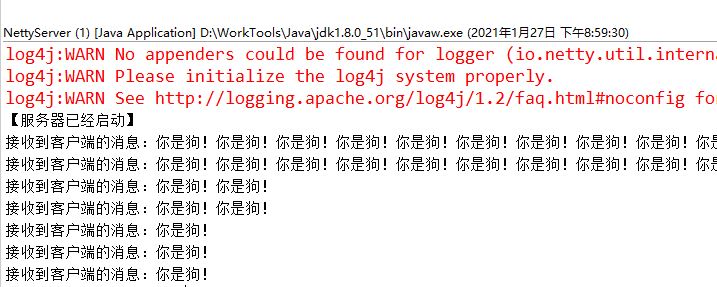
可以看出,在没有加入任何处理方案的情况下发生了粘包现象。
解决方案1:LineBasedFrameDecoder
用换行符来解决粘包拆包问题
1、服务端
加上LineBasedFrameDecoder
@Overrideprotected void initChannel(SocketChannel sc) throws Exception {sc.pipeline().addLast(new LineBasedFrameDecoder(1024));//把网络字节流自动解码为 String 对象,属于入站处理器sc.pipeline().addLast(new StringDecoder());sc.pipeline().addLast(new NettyServerHandler());}
2、客户端
加上换行符
for(int i=0;i<200;i++) {String msg="你是狗!\n";cf.channel().writeAndFlush(msg);}
3、运行测试
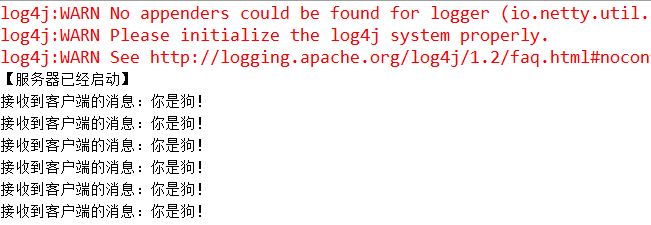
可以看出没有发生粘包了。
解决方案2:DelimiterBasedFrameDecoder
用分隔符来解决粘包拆包问题
1、服务端
加上DelimiterBasedFrameDecoder
@Overrideprotected void initChannel(SocketChannel sc) throws Exception {ByteBuf delimiter = Unpooled.copiedBuffer("$_".getBytes());sc.pipeline().addLast(new DelimiterBasedFrameDecoder(1024,delimiter));//把网络字节流自动解码为 String 对象,属于入站处理器sc.pipeline().addLast(new StringDecoder());sc.pipeline().addLast(new NettyServerHandler());}
2、客户端
加上约定的分隔符
for(int i=0;i<200;i++) {String msg="你是狗!$_";cf.channel().writeAndFlush(msg);}
3、运行测试
可以看出没有发生粘包了。
解决方案3:FixedLengthFrameDecoder
用固定长度来解决粘包拆包的问题
1、服务端
FixedLengthFrameDecoder是根据约定的长度来拆包,在我测试环境win下默认用的是GBK,所以一个汉字是2个字节,这里我要发送”你是狗!”那么就是8个字节,当然你也可以设置为UTF-8编码,那么就是三个字节一个汉字就要12个字节。
@Overrideprotected void initChannel(SocketChannel sc) throws Exception {sc.pipeline().addLast(new FixedLengthFrameDecoder(8));//把网络字节流自动解码为 String 对象,属于入站处理器sc.pipeline().addLast(new StringDecoder());sc.pipeline().addLast(new NettyServerHandler());}
2、客户端
for(int i=0;i<200;i++) {String msg="你是狗!";cf.channel().writeAndFlush(msg);}
3、运行测试
可以看出没有发生粘包了,但是这种情况只能发送8个字节的内容,不然就会解析出错。
