







我们工作中,经常需要借助程序来发送邮件,比如有人在我的博客评论了,然后这个博主有设置邮箱并且设置接收功能的话我就可以发个邮件给用户,那么怎么实现呢!
随笔博客邮箱使用场景设想
- 博主登录随笔博客后台,绑定邮箱账号
- 博主设置接收评论收藏提醒
- 用户点击评论后会登记一条消息到消息队列
- 邮件发送小程序接收到消息后就发送一条消息给博主的邮箱账号
准备工作
当然,发送邮件必须靠邮件服务器,代码只是模拟你登录邮箱然后发送邮件而已,所以这里需要有一个邮件服务器,可以选择网易,也可以选择QQ,这里选择的是腾讯QQ。
登录邮箱,生成授权码
这步很简单,因为我是用QQ邮箱,登录邮箱如下配置:
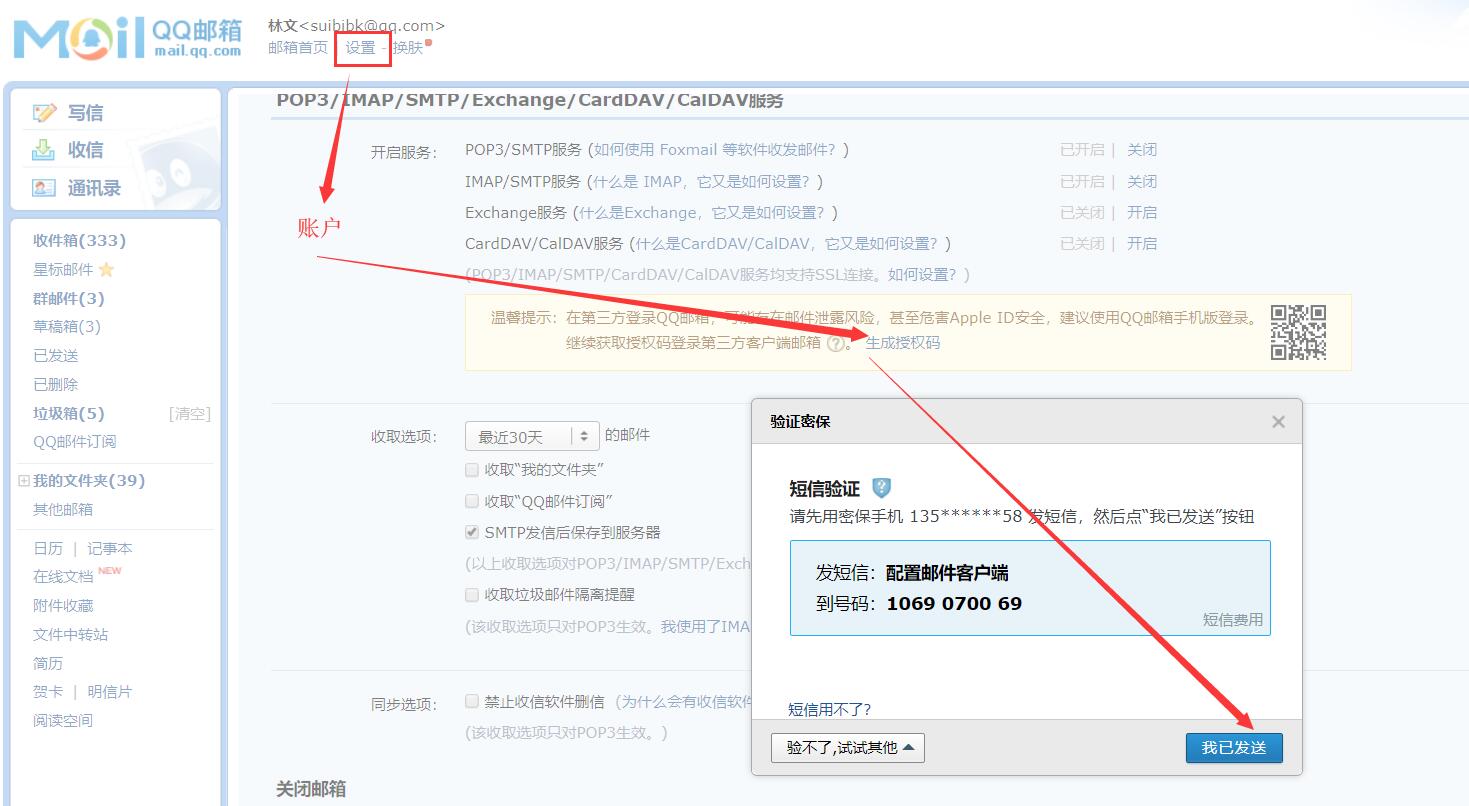
这里主要的是获取授权码。
代码示例
这里只是举一个发送邮件的例子。
1、pom.xml
<!-- email --><dependency><groupId>org.apache.commons</groupId><artifactId>commons-email</artifactId><version>1.4</version></dependency>
2、MailInfo
public class MailInfo {// 收件人private List<String> toAddress = null;// 抄送人地址private List<String> ccAddress = null;// 密送人private List<String> bccAddress = null;// 附件信息private List<EmailAttachment> attachments = null;// 邮件主题private String subject;// 邮件的文本内容private String content;public List<String> getToAddress() {return toAddress;}public void setToAddress(List<String> toAddress) {this.toAddress = toAddress;}public List<String> getCcAddress() {return ccAddress;}public void setCcAddress(List<String> ccAddress) {this.ccAddress = ccAddress;}public List<String> getBccAddress() {return bccAddress;}public void setBccAddress(List<String> bccAddress) {this.bccAddress = bccAddress;}public List<EmailAttachment> getAttachments() {return attachments;}public void setAttachments(List<EmailAttachment> attachments) {this.attachments = attachments;}public String getSubject() {return subject;}public void setSubject(String subject) {this.subject = subject;}public String getContent() {return content;}public void setContent(String content) {this.content = content;}@Overridepublic String toString() {return "MailInfo [toAddress=" + toAddress + ", ccAddress=" + ccAddress + ", bccAddress=" + bccAddress+ ", attachments=" + attachments + ", subject=" + subject + ", content=" + content + "]";}}
3、MailUtil
public class MailUtil {//邮箱private static String mailServerHost = "smtp.qq.com";private static String mailSenderAddress = "suibibk@qq.com";private static String mailSenderNick = "随笔博客";private static String mailSenderUsername = "suibibk@qq.com";private static String mailSenderPassword = "授权码";/*** 发送 邮件方法 (Html格式,支持附件)** @return void*/public static void sendEmail(MailInfo mailInfo) {try {HtmlEmail email = new HtmlEmail();// 配置信息email.setHostName(mailServerHost);email.setFrom(mailSenderAddress,mailSenderNick);email.setAuthentication(mailSenderUsername,mailSenderPassword);email.setCharset("UTF-8");email.setSubject(mailInfo.getSubject());email.setHtmlMsg(mailInfo.getContent());// 添加附件List<EmailAttachment> attachments = mailInfo.getAttachments();if (null != attachments && attachments.size() > 0) {for (int i = 0; i < attachments.size(); i++) {email.attach(attachments.get(i));}}// 收件人List<String> toAddress = mailInfo.getToAddress();if (null != toAddress && toAddress.size() > 0) {for (int i = 0; i < toAddress.size(); i++) {email.addTo(toAddress.get(i));}}// 抄送人List<String> ccAddress = mailInfo.getCcAddress();if (null != ccAddress && ccAddress.size() > 0) {for (int i = 0; i < ccAddress.size(); i++) {email.addCc(ccAddress.get(i));}}//邮件模板 密送人List<String> bccAddress = mailInfo.getBccAddress();if (null != bccAddress && bccAddress.size() > 0) {for (int i = 0; i < bccAddress.size(); i++) {email.addBcc(ccAddress.get(i));}}email.send();System.out.println("邮件发送成功!");} catch (EmailException e) {e.printStackTrace();}}
4、测试
public class App {/*** @return void* @throws MalformedURLException*/public static void main(String[] args) throws MalformedURLException {MailInfo mailInfo = new MailInfo();List<String> toList = new ArrayList<String>();toList.add("suibibk@qq.com");List<String> ccList = new ArrayList<String>();ccList.add("suibibk@qq.com");List<String> bccList = new ArrayList<String>();bccList.add("suibibk@qq.com");//添加附件EmailAttachment att = new EmailAttachment();att.setPath("C:\\Users\\forever\\Desktop\\活动管理平台\\images\\homeQrcode-b41d95e01e.png");att.setName("图片.png");List<EmailAttachment> atts = new ArrayList<EmailAttachment>();atts.add(att);mailInfo.setAttachments(atts);mailInfo.setToAddress(toList);//收件人mailInfo.setCcAddress(ccList);//抄送人mailInfo.setBccAddress(bccList);//密送人mailInfo.setSubject("测试主题");mailInfo.setContent("内容:<h1>test,测试</h1>");MailUtil.sendEmail(mailInfo);}}
运行测试程序,会提示发送成功,再看一下邮箱也接收到啦,要用网易请自行登录到网易邮箱去设置。
