






上一篇博文我们大概了解了什么叫做微服务,以及为什么要用SpringCloud微服务框架。所以我们这里就一步步来,先对SpringCloud所有要求的技术进行入门学习,而后再深入了解各懵技术以及相应的问题研究。我们现在开始吧。
一、服务治理的含义
在传统rpc远程调用中,服务与服务依赖关系,管理比较复杂,所以需要使用服务治理,管理服务与服务之间依赖关系,可以实现服务调用、负载均衡、容错等,实现服务发现与注册。
二、服务注册与发现
在服务注册与发现中,有一个注册中心,当服务器启动的时候,会把当前自己服务器的信息 比如 服务地址通讯地址等以别名方式注册到注册中心上。
另一方(消费者|服务提供者),以该别名的方式去注册中心上获取到实际的服务通讯地址,让后在实现本地rpc调用远程。
三、Eureka注册中心搭建
下面我们开始搭建Eureka注册中心
1、项目结构

端口使用8000
2、pom.xml
<project xmlns="http://maven.apache.org/POM/4.0.0" xmlns:xsi="http://www.w3.org/2001/XMLSchema-instance" xsi:schemaLocation="http://maven.apache.org/POM/4.0.0 http://maven.apache.org/xsd/maven-4.0.0.xsd"><modelVersion>4.0.0</modelVersion><groupId>cn.myforever</groupId><artifactId>springcloud-config-eureka</artifactId><version>0.0.1-SNAPSHOT</version><parent><groupId>org.springframework.boot</groupId><artifactId>spring-boot-starter-parent</artifactId><version>2.0.0.RELEASE</version></parent><!-- 管理依赖 --><dependencyManagement><dependencies><dependency><groupId>org.springframework.cloud</groupId><artifactId>spring-cloud-dependencies</artifactId><version>Finchley.M7</version><type>pom</type><scope>import</scope></dependency></dependencies></dependencyManagement><dependencies><!--SpringCloud eureka-server --><dependency><groupId>org.springframework.cloud</groupId><artifactId>spring-cloud-starter-netflix-eureka-server</artifactId></dependency></dependencies><!-- 注意: 这里必须要添加, 否者各种依赖有问题 --><repositories><repository><id>spring-milestones</id><name>Spring Milestones</name><url>https://repo.spring.io/libs-milestone</url><snapshots><enabled>false</enabled></snapshots></repository></repositories></project>
这里用的是SpringCloud2.0,主要是引入如下Eureka的依赖
<!--SpringCloud eureka-server --><dependency><groupId>org.springframework.cloud</groupId><artifactId>spring-cloud-starter-netflix-eureka-server</artifactId></dependency>
3、application.yml
###服务端口号server:port: 8000##定义服务名称spring:application:name: app-myforever-eurekaeureka:instance:###注册中心ip地址hostname: 127.0.0.1client:serviceUrl:##注册地址defaultZone: http://${eureka.instance.hostname}:${server.port}/eureka/####因为自己是注册中心,是否需要将自己注册给自己的注册中心(集群的时候是需要是为true)register-with-eureka: false###因为自己是注册中心, 不需要去检索服务信息fetch-registry: false# 测试时关闭自我保护机制,保证不可用服务及时踢出server:# 测试时关闭自我保护机制,保证不可用服务及时踢出enable-self-preservation: false### ##剔除失效服务间隔eviction-interval-timer-in-ms: 2000
4、EurekaServerApp.java
package cn.myforever.eureka;import org.springframework.boot.SpringApplication;import org.springframework.boot.autoconfigure.SpringBootApplication;import org.springframework.cloud.netflix.eureka.server.EnableEurekaServer;@SpringBootApplication@EnableEurekaServer //开启eurekaserverpublic class EurekaServerApp {public static void main(String[] args) {SpringApplication.run(EurekaServerApp.class, args);}}
@EnableEurekaServer:作用是开启EurekaServer
5、启动测试
启动AppEureka8100,然后访问
http://127.0.0.1:8000/
页面出现如下内容即可表示注册中心已经搭建成功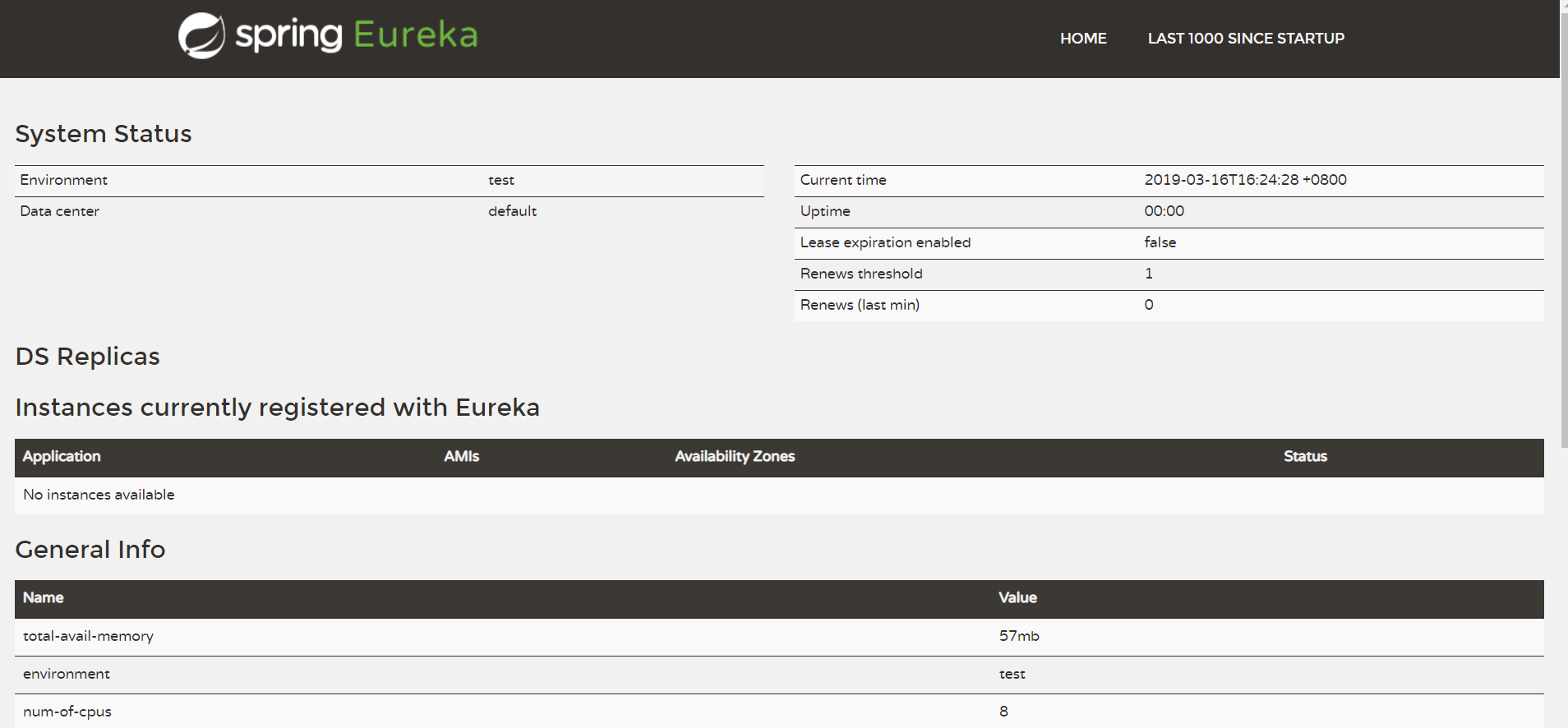
这里还没有任何服务进来。
四、服务提供者
服务提供者扮演提供服务的角色,这里提供的是Http的服务,但是我们微服务这里,服务提供者在启动的时候应该也会向注册中心注册,所以服务提供者这里也相当于是注册中心的客户端,而我们上面启动的注册中心是服务端。
1、项目结构
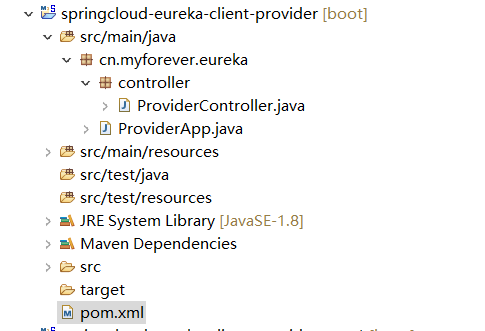
这里端口号用的是8080
2、pom.xml
<project xmlns="http://maven.apache.org/POM/4.0.0" xmlns:xsi="http://www.w3.org/2001/XMLSchema-instance" xsi:schemaLocation="http://maven.apache.org/POM/4.0.0 http://maven.apache.org/xsd/maven-4.0.0.xsd"><modelVersion>4.0.0</modelVersion><groupId>cn.myforever</groupId><artifactId>springcloud-eureka-client-provider</artifactId><version>0.0.1-SNAPSHOT</version><parent><groupId>org.springframework.boot</groupId><artifactId>spring-boot-starter-parent</artifactId><version>2.0.0.RELEASE</version></parent><!-- 管理依赖 --><dependencyManagement><dependencies><dependency><groupId>org.springframework.cloud</groupId><artifactId>spring-cloud-dependencies</artifactId><version>Finchley.M7</version><type>pom</type><scope>import</scope></dependency></dependencies></dependencyManagement><dependencies><!-- SpringBoot整合Web组件 --><dependency><groupId>org.springframework.boot</groupId><artifactId>spring-boot-starter-web</artifactId></dependency><!-- SpringBoot整合eureka客户端 --><dependency><groupId>org.springframework.cloud</groupId><artifactId>spring-cloud-starter-netflix-eureka-client</artifactId></dependency></dependencies><!-- 注意: 这里必须要添加, 否者各种依赖有问题 --><repositories><repository><id>spring-milestones</id><name>Spring Milestones</name><url>https://repo.spring.io/libs-milestone</url><snapshots><enabled>false</enabled></snapshots></repository></repositories></project>
主要是引入依赖
<!-- SpringBoot整合Web组件 --><dependency><groupId>org.springframework.boot</groupId><artifactId>spring-boot-starter-web</artifactId></dependency><!-- SpringBoot整合eureka客户端 --><dependency><groupId>org.springframework.cloud</groupId><artifactId>spring-cloud-starter-netflix-eureka-client</artifactId></dependency>
因为这里意义上提供的服务都是web服务,是简单的json返回格式的http服务,所以需要引入web组件。
3、application.xml
###服务提供者启动端口server:port: 8080###服务名称(服务注册到eureka名称)spring:application:name: app-myforever-provide###服务注册到eureka地址eureka:client:service-url:defaultZone: http://localhost:8000/eureka###注册到Eurekaregister-with-eureka: true###是否需要从eureka上获取注册信息fetch-registry: true#默认(EurekaInstanceConfigBean:leaseRenewalIntervalInSeconds = 30; leaseExpirationDurationInSeconds = 90;)#instance:#Eureka客户端向服务端发送心跳的时间间隔,单位为秒(客户端告诉服务端自己会按照该规则)# lease-renewal-interval-in-seconds: 10#Eureka服务端在收到最后一次心跳之后等待的时间上限,单位为秒,超过则剔除(客户端告诉服务端按照此规则等待自己)# lease-expiration-duration-in-seconds: 5
这里跟Eureka服务端的区别就是这里要去注册中心注册自己,所以下面的两个属性都是ture,顺便提醒一下,后面如果注册中心要做集群,则注册中心要相互注册,这两个属性也会变成true.
###注册到Eurekaregister-with-eureka: true###是否需要从eureka上获取注册信息fetch-registry: true
app-myforever-provide是注册到注册中心的别名,消费者就是靠这个来获取服务提供者的真实ip。这样子就算提供者要换ip,只要别名不变消费者都可以通过注册中心找到真实的ip。
4、提供服务类ProviderController.java
package cn.myforever.eureka.controller;import org.springframework.beans.factory.annotation.Value;import org.springframework.web.bind.annotation.RequestMapping;import org.springframework.web.bind.annotation.RestController;/*** 服务提供者* @author forever**/@RestControllerpublic class ProviderController {@Value(value="${server.port}")private String port;@RequestMapping("/provider")public String index() {return "我是服务提供者"+port;}}
| 内容 | 作用 |
|---|---|
| @RestController | 表明返回的是json格式的数据 |
| @Value(value=”${server.port}”) | 表示端口号,是从application.yml中获取的 |
| @RequestMapping(“/provider”) | 请求路径是http://127.0.0.1:8080/provider |
5、启动类ProviderApp.java
package cn.myforever.eureka;import org.springframework.boot.SpringApplication;import org.springframework.boot.autoconfigure.SpringBootApplication;import org.springframework.cloud.netflix.eureka.EnableEurekaClient;@SpringBootApplication@EnableEurekaClientpublic class ProviderApp {public static void main(String[] args) {SpringApplication.run(ProviderApp.class, args);}}
@EnableEurekaClient表示这个是Eureka客户端,启动的时候会将自己的信息注册到注册中心(Eureka服务端)。
6、启动测试
先启动Eureka注册中心,再启动该服务提供者,然后先测试服务是否启动正常,访问链接http://127.0.0.1:8080/provider, 返回:我是服务提供者8080表示服务正常,再刷新注册中心页面http://127.0.0.1:8000/, 查看服务是否注册到注册中心,若出现如下界面,就表示服务发布者已经将服务发布成功,并且将服务注册到了注册中心。
五、服务消费者
上面已经搭建好了服务提供者,这里我们可以搭建服务消费者去消费http://127.0.0.1:8080/provider 服务。
1、项目结构
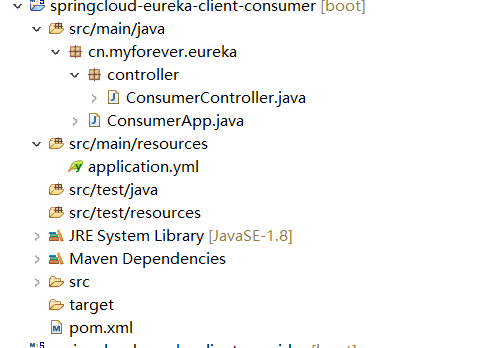
端口是8082
2、pom.xml
<project xmlns="http://maven.apache.org/POM/4.0.0" xmlns:xsi="http://www.w3.org/2001/XMLSchema-instance" xsi:schemaLocation="http://maven.apache.org/POM/4.0.0 http://maven.apache.org/xsd/maven-4.0.0.xsd"><modelVersion>4.0.0</modelVersion><groupId>cn.myforever</groupId><artifactId>springcloud-eureka-client-consumer</artifactId><version>0.0.1-SNAPSHOT</version><parent><groupId>org.springframework.boot</groupId><artifactId>spring-boot-starter-parent</artifactId><version>2.0.0.RELEASE</version></parent><!-- 管理依赖 --><dependencyManagement><dependencies><dependency><groupId>org.springframework.cloud</groupId><artifactId>spring-cloud-dependencies</artifactId><version>Finchley.M7</version><type>pom</type><scope>import</scope></dependency></dependencies></dependencyManagement><dependencies><!-- SpringBoot整合Web组件 --><dependency><groupId>org.springframework.boot</groupId><artifactId>spring-boot-starter-web</artifactId></dependency><!-- SpringBoot整合eureka客户端 --><dependency><groupId>org.springframework.cloud</groupId><artifactId>spring-cloud-starter-netflix-eureka-client</artifactId></dependency></dependencies><!-- 注意: 这里必须要添加, 否者各种依赖有问题 --><repositories><repository><id>spring-milestones</id><name>Spring Milestones</name><url>https://repo.spring.io/libs-milestone</url><snapshots><enabled>false</enabled></snapshots></repository></repositories></project>
这里引入的依赖,其实跟服务消费者是一样的,毕竟也是个web应用,也是Eureka客户端。
<!-- SpringBoot整合Web组件 --><dependency><groupId>org.springframework.boot</groupId><artifactId>spring-boot-starter-web</artifactId></dependency><!-- SpringBoot整合eureka客户端 --><dependency><groupId>org.springframework.cloud</groupId><artifactId>spring-cloud-starter-netflix-eureka-client</artifactId></dependency>
3、application.yml
这里也其实跟服务提供者一样的,只不过端口和别名不同
###服务提供者启动端口server:port: 8082###服务名称(服务注册到eureka名称)spring:application:name: app-myforever-consumer###服务注册到eureka地址eureka:client:service-url:defaultZone: http://localhost:8000/eureka###因为该应用为注册中心register-with-eureka: true###是否需要从eureka上获取注册信息fetch-registry: true#默认(EurekaInstanceConfigBean:leaseRenewalIntervalInSeconds = 30; leaseExpirationDurationInSeconds = 90;)# instance:#Eureka客户端向服务端发送心跳的时间间隔,单位为秒(客户端告诉服务端自己会按照该规则)# lease-renewal-interval-in-seconds: 10#Eureka服务端在收到最后一次心跳之后等待的时间上限,单位为秒,超过则剔除(客户端告诉服务端按照此规则等待自己)# lease-expiration-duration-in-seconds: 5
4、服务消费程序ConsumerController.java
package cn.myforever.eureka.controller;import org.springframework.beans.factory.annotation.Autowired;import org.springframework.web.bind.annotation.RequestMapping;import org.springframework.web.bind.annotation.RestController;import org.springframework.web.client.RestTemplate;/*** 服务提供者* @author forever**/@RestControllerpublic class ConsumerController {//使用rest方式调用服务,当然也可以走rpc调用@Autowiredprivate RestTemplate restTemplate;@RequestMapping("/consumer")public String index() {String url = "http://APP-MYFOREVER-PROVIDE/provider";String result=restTemplate.getForObject(url, String.class);System.out.println("服务消费者调用服务提供者,返回值:"+result);return result;}}
这里主要是通过RestTemplate来调用服务,并且url也只需要用服务提供者注册到注册中心的别名即可。但是注意在服务启动类上要生成RestTemplate的bean。
5、启动类ConsumerApp.java
package cn.myforever.eureka;import org.springframework.boot.SpringApplication;import org.springframework.boot.autoconfigure.SpringBootApplication;import org.springframework.cloud.client.loadbalancer.LoadBalanced;import org.springframework.cloud.netflix.eureka.EnableEurekaClient;import org.springframework.context.annotation.Bean;import org.springframework.web.client.RestTemplate;@SpringBootApplication@EnableEurekaClientpublic class ConsumerApp {public static void main(String[] args) {SpringApplication.run(ConsumerApp.class, args);}@Bean@LoadBalancedpublic RestTemplate restTemplate() {return new RestTemplate();}}
@EnableEurekaClient 表示会作为Eureka注册中心启动。
@LoadBalanced就能让这个RestTemplate在请求时拥有客户端负载均衡的能力。也就是ribbon,本地负载均衡的功能,这里默认是轮询,原理是从注册中心获取服务,若是服务是集群,则轮询去调用服务。
6、启动和测试

访问消费程序http://127.0.0.1:8082/consumer 。 返回结果:我是服务提供者8080,表示服务调用成功,因为这句话是服务提供者返回的。
六、本地负载均衡测试
1、修改服务提供则的端口为8081,然后再启动
2、刷新注册中心
会看到如下图所示,提供者已经变成了集群
3、访问服务消费者
结果一直在:我是服务提供者8080、我是服务提供者8081二者之间轮询,表示客户端负载均衡成功,@LoadBalanced注解的作用就是开启客户端负载均衡。
七、Eureka高可用
在微服务中,注册中心非常核心,可以实现服务治理,如果一旦注册出现故障的时候,可能会导致整个微服务无法访问,在这时候就需要对注册中心实现高可用集群模式。。配置方式如下。
1、新建一个Eureka服务端
这个参考上面的注册中心搭建方法
2、配置文件application.yml如下
#服务端口号server:port: 8001#集群的话多个注册中心要相同spring:application:name: eureka-server#eureka基本配置信息eureka:instance:#注册到eureka的ip地址hostname: 127.0.0.1client:serviceUrl:#集群的话,这里需要指向的是别的注册中心的地址,多个的话要用逗号隔开defaultZone: http://127.0.0.1:8000/eureka#因为自己是为注册中心,不需要自己注册自己(集群的话要改为true)register-with-eureka: true#因为自己是注册中心,不需要检索服务(集群的话要改为true)fetch-registry: true#默认:EurekaServerConfigBean中enableSelfPreservation = true;以及evictionIntervalTimerInMs = 60 * 1000;#server:#关闭保护机制,默认开启# enable-self-preservation: false#剔除失效服务间隔 默认60秒,这里改为2秒#eviction-interval-timer-in-ms: 2000
具体修改
defaultZone:这里要指向别的注册中心,如果还有集群(也就是不止两个)就需要用逗号隔开。register-with-eureka: truefetch-registry: true
3、修改第一个注册中心application.yml如下
其实内容跟上一个差不多,只不过端口号不同以及
#服务端口号server:port: 8000#集群的话多个注册中心要相同defaultZone指向不同spring:application:name: eureka-server#eureka基本配置信息eureka:instance:#注册到eureka的ip地址hostname: 127.0.0.1client:serviceUrl:#集群的话,这里需要指向的是别的注册中心的地址defaultZone: http://127.0.0.1:8001/eureka#因为自己是为注册中心,不需要自己注册自己(集群的话要改为true)register-with-eureka: true#因为自己是注册中心,不需要检索服务(集群的话要改为true)fetch-registry: true#默认:EurekaServerConfigBean中enableSelfPreservation = true;以及evictionIntervalTimerInMs = 60 * 1000;#server:#关闭保护机制,默认开启# enable-self-preservation: false#剔除失效服务间隔 默认60秒,这里改为2秒#eviction-interval-timer-in-ms: 2000
4、修改服务提供者和发布者的配置文件application.yml
defaultZone: http://localhost:8000/eureka,http://localhost:8001/eureka
5、启动两个注册中心以及服务消费者和提供者
分别访问两个注册中心的地址
http://127.0.0.1:8000/,http://127.0.0.1:8001/
结果如下:
http://127.0.0.1:8000/:
http://127.0.0.1:8001/:
可以发现,一个注册中心只会有对方注册中心的信息,但是另一个却还包含了服务提供者和服务发现者的信息。Eureka高可用实际上将自己作为服务向其他服务注册中心注册自己,这样就可以形成一组相互注册的服务注册中心,从而实现服务清单的互相同步,达到高可用效果。
6、测试
访问服务消费者,结果正常返回,此时服务消费者和服务提供者都注册在8001上面,我们停掉8001,然后再测试。发现也可以正常访问,然后查看8000的注册中心,会发现服务提供者和消费者已经转移过来了,至此实现可高可用。
七、Eureka详解
1、服务消费
消费者启动的时候,使用服务别名,会发送一个rest请求到服务注册中心获取对应的服务信息,让后会缓存到本地jvm客户端中,同时客户端每隔30秒从服务器上更新一次。
可以通过 fetch-intevall-seconds=30参数设置时间。
####需要检索服务fetch-registry: trueregistry-fetch-interval-seconds: 30
2、服务下线
1、客户端发起
在系统运行过程中必然会面临关闭或重启服务的某个实例的情况,在服务关闭期有我们自然不希望客户端会继续调用关闭了的实例。所以在客户端程序中,当服务实例过正常的关闭操作时,它会触发一个服务下线的REST请求给Eureka Server, 告诉服务日中心:“我要下线了”。服务端在接收到请求之后,将该服务状态置为下线(DOWN),井该下线事件传播出去。
2、服务端发起
有些时候,我们的服务实例并不一定会正常下线,可能由于内存溢出、网络故障气因使得服务不能正常工作,而服务注册中心并未收到“服务下线”的请求。为了从服务表中将这些无法提供服务的实例剔除,Eureka Server 在启动的时候会创建一个定时任多默认每隔一一段时间(默认为60秒)将当前清单中超时(默认为90秒)没有续约的服务除出去。
3、EurekaServer服务自我保护机制
默认情况下,EurekaClient会定时向EurekaServer端发送心跳,如果EurekaServer在一定时间内没有收到EurekaClient发送的心跳,便会把该实例从注册服务列表中剔除(默认是90秒),但是在短时间内丢失大量的实例心跳,这时候EurekaServer会开启自我保护机制,Eureka不会踢出该服务。该保护机制的目的是避免网络连接故障,在发生网络故障时,微服务和注册中心之间无法正常通信,但服务本身是健康的,不应该注销该服务,如果eureka因网络故障而把微服务误删了,那即使网络恢复了,该微服务也不会重新注册到eureka server了,因为只有在微服务启动的时候才会发起注册请求,后面只会发送心跳和服务列表请求,这样的话,该实例虽然是运行着,但永远不会被其它服务所感知。所以,eureka server在短时间内丢失过多的客户端心跳时,会进入自我保护模式,该模式下,eureka会保护注册表中的信息,不在注销任何微服务,当网络故障恢复后,eureka会自动退出保护模式。自我保护模式可以让集群更加健壮。
4、开发环境关闭自我保护机制
我们在开发测试阶段,需要频繁地重启发布,如果触发了保护机制,则旧的服务实例没有被删除,这时请求有可能跑到旧的实例中,而该实例已经关闭了,这就导致请求错误,影响开发测试。所以,在开发测试阶段,我们可以把自我保护模式关闭,
a、Eureka服务端配置
只需在eureka server配置文件中加上如下配置即可:
server:# 测试时关闭自我保护机制,保证不可用服务及时踢出enable-self-preservation: false##剔除失效服务间隔eviction-interval-timer-in-ms: 2000
但在生产环境,不会频繁重启,所以,一定要把自我保护机制打开,否则网络一旦终端,就无法恢复。
b、客户端配置
然后客户端也可以设置心跳检测时间来
# 心跳检测检测与续约时间# 测试时将值设置设置小些,保证服务关闭后注册中心能及时踢出服务instance:###Eureka客户端向服务端发送心跳的时间间隔,单位为秒(客户端告诉服务端自己会按照该规则)lease-renewal-interval-in-seconds: 1####Eureka服务端在收到最后一次心跳之后等待的时间上限,单位为秒,超过则剔除(客户端告诉服务端按照此规则等待自己)lease-expiration-duration-in-seconds: 2
结语
本篇博文主要讲解了Eureka注册中心的搭建,服务提供者、服务消费者、本地负载均衡、Eureka高可用、服务保护机制。
